Canva Editable Book Mockup Templates: Professional Displays
Why Your Book Deserves Better Than a Flat JPEG
Let's be honest—nothing kills a potential reader's interest faster than a poorly presented book cover. You've spent months, maybe years, crafting your manuscript. You've agonized over every word, revised chapters multiple times, and finally nailed that perfect cover design. But then you slap it onto a basic flat image for your website or social media, and it looks... amateur. This is exactly where Canva editable book mockup templates change everything for authors and publishers.
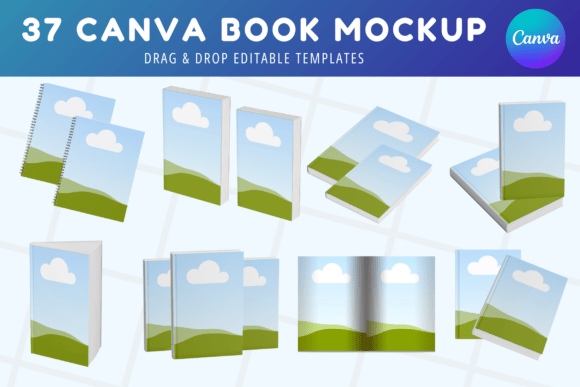
The bundle we're discussing includes 37 thoughtfully designed templates that transform your static cover files into three-dimensional, professional presentations. Think of these as digital photography studio sessions for your books—except you control every angle, shadow, and background without hiring a photographer or learning complicated 3D software. Each template captures realistic lighting, natural book proportions, and those subtle details like page thickness and spine depth that make viewers instinctively reach for their wallet.
What Makes These Mockups Actually Useful
The real power lies in customization. Every single template opens directly in Canva, which means you're working inside a platform you probably already know. No downloading additional software. No wrestling with layered PSD files in Photoshop. You simply drag your cover image into the designated area, adjust positioning if needed, and export. The drag and drop editing process takes minutes, not hours.
What I appreciate about this particular collection is the variety. You're not getting 37 versions of the same angle with different backgrounds. The bundle covers multiple formats:
- Hard cover mockup designs that showcase premium editions with visible spine detail
- Paperback and standard book cover mockup options for everyday publishing projects
- Magazine mockup templates for periodical-style publications
- Hardback mockup variations with realistic page fanning effects
- Multiple perspective angles—standing, lying flat, slightly open, and grouped arrangements
Each template uses high resolution imagery, so your final exports look crisp whether someone views them on a phone screen or prints them for a trade show banner. The visual style leans modern and clean—think neutral backgrounds, soft natural lighting, and minimal distractions that keep attention squarely on your cover artwork.
Practical Applications for Real Marketing Scenarios
Here's where I see creators struggle most: they have a great book but no idea how to present it across different platforms. A cover that looks fantastic as a thumbnail on Amazon might look awkward as a Facebook banner. An Instagram post requires different dimensions than a Pinterest pin. These Canva book mockup templates solve that problem because you can resize, recolor backgrounds, and rearrange elements to fit any platform's specifications.
For KDP mockup template needs specifically, this bundle shines. Amazon's marketplace is brutally competitive. Readers scroll through hundreds of options, making split-second decisions based on visual appeal. A professional three-dimensional mockup signals quality before anyone reads your description. It suggests you take your craft seriously—and that confidence transfers to the buyer's perception of your writing.
Beyond Amazon, consider these applications:
- Social media graphics for book launch announcements and countdown posts
- Website hero images and landing page banners
- Email newsletter headers for author updates
- Press kit materials for media outreach
- Print materials like bookmarks, posters, and event displays
- Client presentations if you design covers for other authors
Small publishing businesses find particular value here because one bundle serves multiple authors and titles. Instead of purchasing individual mockups for each release, you rotate through the collection, maintaining visual consistency across your catalog while keeping each book's presentation fresh.
Working Within Canva's Ecosystem
The decision to build these as editable book mockup files within Canva rather than as standalone files matters more than people realize. Canva's interface removes technical barriers. Your marketing assistant can use them. Your virtual assistant in another country can use them. Even someone who's never touched design software before can produce decent results within their first attempt.
That said, experienced designers shouldn't dismiss these as too basic. The templates provide excellent starting points that you can push further—adjusting color overlays, adding texture layers, incorporating brand elements, or combining multiple mockups into composite scenes. Think of them as design assets that accelerate your workflow rather than replace your creative judgment.
Choosing the Right Template for Your Project
Not every mockup suits every book. A cozy romance novel might feel out of place on a stark, minimalist mockup with sharp geometric shadows. A business leadership book probably shouldn't sit on a mockup surrounded by flowers and coffee cups. When browsing the 37 options, consider your genre's visual conventions and your target audience's expectations.
Test how your specific cover colors interact with each template's background tones. Warm covers sometimes clash with cool gray backgrounds. Dark, moody designs can disappear against similarly dark mockup environments. The beauty of these being fully customizable Canva templates is that you can adjust backgrounds to complement rather than compete with your artwork.
For book promotion campaigns spanning several weeks, plan to use three to five different mockups from the bundle. This keeps your visual content varied without looking disjointed, since the templates share a cohesive professional aesthetic. Rotate between close-up detail shots, full-book perspectives, and lifestyle-adjacent arrangements to maintain audience interest across multiple touchpoints.
Final Thoughts on Elevating Your Publishing Presence
Professional presentation isn't vanity—it's strategy. Every touchpoint where a potential reader encounters your book shapes their purchasing decision. A polished, three-dimensional mockup communicates the same attention to detail that quality cover design does. It tells people this author cares about their work from manuscript to marketplace.
Whether you're preparing for your first book launch or refreshing marketing materials for a backlist title, having access to 37 versatile, instantly downloadable templates removes one significant bottleneck from your publishing workflow. The instant digital download means you can start customizing within minutes of purchase, and the commercial-friendly licensing means you can use results across client projects, business materials, and personal promotions without legal headaches.
Your book already has a story worth telling. These mockups simply help that story arrive looking its absolute best.