Mock Up Laptop with Graphic Screen: Showcase Your Designs
Presenting your work to a client or a potential customer is a critical moment. You've poured hours into a design, whether it's a new website layout, a brand identity package, or a series of social media graphics. The way you frame that work can be the difference between a polite nod and an enthusiastic "yes." A flat, uncontextualized JPEG often fails to communicate the real-world application and professional polish of your project. This is precisely where a high-quality mock-up transforms the presentation, turning a static image into a compelling visual story.
More Than Just a Picture: The Anatomy of a Quality Mock-Up
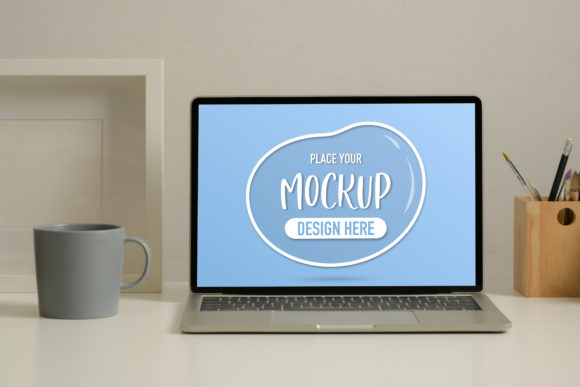
The Mock Up Laptop with Graphic Screen is a design asset built for clarity and impact. At its core, it’s a meticulously crafted digital template that allows you to seamlessly integrate your own work onto the screen of a realistic laptop. The visual style leans towards clean, modern aesthetics. The laptop itself is rendered with subtle lighting, realistic textures, and a neutral color palette, ensuring it complements your design rather than competing with it. This isn't a cartoonish or overly stylized illustration; it's a professional tool designed to make your work look its best.
The true personality of this mock-up lies in its versatility and ease of use. It’s engineered for designers, entrepreneurs, and creators who need to produce polished presentations quickly. You won't waste time wrestling with complex layers or trying to match perspective. The included PSD file is logically organized, with smart object layers that make inserting your artwork a simple click-and-replace action. For those who need a quick export, the high-resolution JPG file provides a ready-to-use base. This combination of professional quality and practical utility makes it an indispensable part of a modern design assets toolkit.
Where This Mock-Up Shines: Real-World Applications
Think about the last time you needed to show a client a website redesign. Instead of sending a simple screenshot, you can place that design onto the Mock Up Laptop with Graphic Screen. Suddenly, the client can visualize the site on a device, understanding its layout, navigation, and visual hierarchy in a context they use every day. This same principle applies across countless scenarios:
- For Graphic Designers and Brand Strategists: Perfect for showcasing a full brand identity system. Present your logo, color palette, and typography guidelines in a cohesive, professional manner. Show how the brand translates to a digital interface, which is crucial for modern businesses.
- For Marketers and Content Creators: Ideal for creating compelling social media graphics, blog post headers, or email newsletter previews. Announcing a new online course? Display the course dashboard on the laptop screen. Promoting a digital product? Show it in action, ready for purchase.
- For Web and UI/UX Designers: This is your go-to for portfolio presentations. Display your latest app interface or e-commerce site design with confidence. It provides a clean, professional frame that highlights your web design skills and attention to detail.
- For Entrepreneurs and Small Business Owners: You don't need to be a design expert to use this. If you're launching a new service, writing an e-book, or creating online marketing materials, this mock-up helps you present your ideas with a level of polish that builds credibility and trust.
The appeal is universal because it solves a fundamental problem: making digital work feel tangible and professional. It bridges the gap between your screen and your audience's perception.
Integrating the Mock-Up into Your Workflow
Using the Mock Up Laptop with Graphic Screen effectively is about more than just a technical process; it's about strategic presentation. Your goal is to guide the viewer's eye directly to your work. Here’s how to approach it for maximum impact.
Evaluating Fit and Preparing Your Design
Before you even open the file, consider the context. Is your design meant to be viewed on a large desktop monitor or a smaller laptop screen? This mock-up is versatile, but ensuring your artwork's resolution and aspect ratio match the screen's perspective is key to a believable result. Prepare your final design as a high-quality, flattened image (like a PNG or high-res JPG) for the smart object. If your project is a logo design, ensure it's centered and scaled appropriately for the screen's real estate.
Mastering the Placement and Environment
Once your design is placed, think about the surrounding elements. The power of this mock-up is its neutrality. If you're placing it in a larger scene—for example, on a blog or in a social media ad—choose a background that doesn't distract. A simple gradient, a subtle texture, or a clean studio environment works best. The laptop is the stage; your design is the star. Avoid cluttering the frame with unrelated graphics or text that could dilute your message.
The Final Check: Authenticity and Consistency
Step back and look at the final composite. Does it look real? Are the lighting and shadows consistent? A common mistake is ignoring the light source in the mock-up. Ensure your inserted design doesn't have its own, conflicting shadows or highlights. This attention to detail is what separates an amateurish mock-up from a professional one. Use this asset consistently across your portfolio, proposals, and marketing materials. This consistency reinforces your brand identity and establishes a recognizable, professional standard for all your communications.
In the end, the Mock Up Laptop with Graphic Screen